How to Choose the Best Windows VPS for Your Needs?
Choosing the best Windows VPS is a critical task for businesses and developers alike. According to Johnathan Smith, a leading expert in cloud solutions, "Selecting the right Windows VPS can make or break your online presence." This insight emphasizes the importance of careful consideration. With many options available, understanding your needs is key.
A Windows VPS provides flexibility and control. However, not all providers offer the same quality. Each has its strengths and weaknesses. Testing different solutions is vital. Are the features relevant to your goals? The right choice can enhance performance and security.
When assessing a Windows VPS, consider factors like bandwidth, storage, and support. Each element plays a role in your overall experience. Yet, it is easy to be overwhelmed by choices. Reflecting on what you truly need will lead to better decision-making. This process may not be perfect, but it opens doors to optimal solutions.

Understanding Your Hosting Requirements for Windows VPS
When considering a Windows VPS, understanding your hosting requirements is crucial. Start by evaluating your resource needs. Do you require ample CPU power, or is memory more essential? Misjudging these needs can lead to slow performance. Think about your project’s scale. A small site may not need extensive resources, while a growing business certainly does.
Next, consider your level of technical expertise. Are you comfortable managing a server, or do you need a more user-friendly interface? Complex setups can be overwhelming. It's okay if you're not tech-savvy. Choosing a managed VPS might alleviate stress. Additionally, assess security features. Data protection is paramount. A VPS without robust security can expose you to risks.
Finally, reflect on your budget. Balance your needs with what you can afford. Sometimes, opting for the cheapest plan can be a mistake. This might lead to insufficient resources or limited support. Always read user reviews before making a decision. Each factor matters and can significantly impact your experience with a Windows VPS.
How to Choose the Best Windows VPS for Your Needs?
| Criteria |
Considerations |
Importance Level |
| Performance |
CPU speed, RAM, SSD storage |
High |
| Scalability |
Ability to upgrade resources easily |
Medium |
| Support |
Technical support availability and quality |
High |
| Security |
Firewalls, VPN options, DDoS protection |
High |
| Location |
Data center locations for latency considerations |
Medium |
| Cost |
Monthly pricing versus features |
High |
| Control |
Level of access to server settings |
Medium |
| Backup Solutions |
Automatic backups and data recovery options |
Medium |
Key Features to Consider in a Windows VPS Solution
Choosing the right Windows VPS requires careful consideration of key features. Resource allocation is crucial. Look for a VPS that offers sufficient CPU, RAM, and bandwidth for your applications. Inadequate resources can lead to slow performance, especially during peak hours. It's vital to assess your needs before making a decision.
Security features are equally important. Ensure that the VPS solution includes firewalls, DDoS protection, and regular backups. These elements help protect your data from potential attacks. Without a strong security framework, your information may be vulnerable. Evaluate the security offerings of potential providers thoroughly.
Scalability is another essential aspect. Your business may grow, and your VPS should adapt accordingly. Look for options that allow easy upgrades. Some solutions may not offer seamless scaling, leading to disruptions. Understanding future requirements is key to making the right choice.
Evaluating Performance Metrics for Windows VPS Options
When evaluating Windows VPS options, performance metrics are crucial. Start with CPU performance. A powerful CPU can enhance processing speed and handle demanding applications better. Look for virtual CPUs offered and benchmark scores. They provide insights into what you can expect.
Memory is another vital factor. More RAM allows for seamless multitasking. Consider your specific needs. For instance, web hosting and application servers often require different amounts of memory. Additionally, monitor bandwidth and data transfer limits. Higher bandwidth can improve loading times and enhance user experience.
Storage type impacts performance too. SSD storage tends to be faster than traditional HDDs. Frequent read and write operations benefit from this speed. Examine I/O operations per second (IOPS) as well. Higher IOPS can significantly boost database performance. Sometimes, VPS plans look appealing, but hidden limits can slow down operations over time. It's essential to weigh these aspects thoroughly.
Performance Metrics Comparison of Windows VPS Options
Cost Considerations and Budgeting for Windows VPS
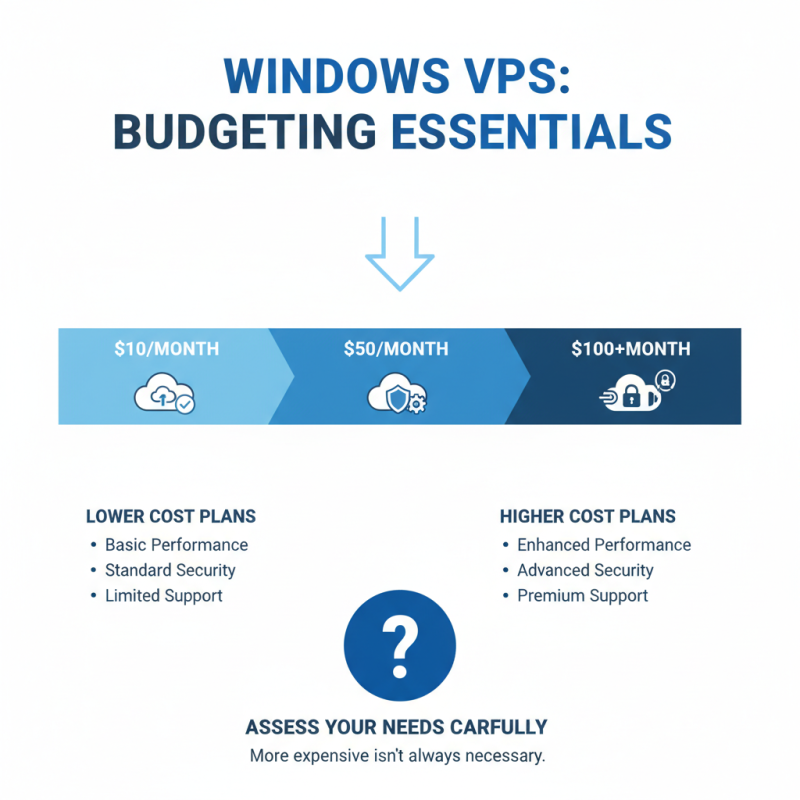
When selecting a Windows VPS, budgeting is essential. The cost of Windows VPS can vary significantly based on features and resources. According to industry data, plans can range from $10 to $100 monthly. Higher prices usually offer better performance, security, and support. However, it’s crucial to assess your needs carefully. A more expensive option isn’t always necessary.
It's beneficial to understand key components affecting costs. For instance, CPU and RAM allocation play major roles. A plan with 2GB of RAM may suffice for a small website. Conversely, a high-traffic application might require 8GB or more. This is where costs can escalate. However, some providers offer flexible scaling options.
Tips: Always read the fine print. Hidden fees can inflate your total costs. Additionally, consider the support options available. Some services offer 24/7 support, which could save potential downtimes.
Assess your budget continually and reflect on your needs. Prices fluctuate due to various factors like demand and features added. By recalibrating your expectations, you can find the right balance between cost and performance. Explore options and don't rush into decisions.
Comparing Providers: Reviews and Reputation in the VPS Market
When selecting a Windows VPS, reviews and reputation are crucial. Many providers boast exceptional services, but it’s vital to dive deeper. User testimonials can reveal the truth behind flashy marketing. Look for clarity in feedback. Genuine reviews often highlight server reliability and customer support quality.
Investigate forums and independent review sites. These platforms usually provide unfiltered experiences. Do not ignore negative reviews; they can be eye-opening. Some users might complain about downtime or slow speeds. Such details can help refine your options. Additionally, consider the response time to support inquiries. A responsive team indicates a reliable provider.
It's also important to evaluate the provider's commitment to service-level agreements. A strong commitment usually reflects reliability. Remember, though, high promises don't guarantee satisfaction. Some users find the actual performance lacking. Testing with trial periods can be essential. A test can help you determine if they meet your expectations before committing long-term.